Door categorieën bladeren
Nederlands
$
USD
Maak verbinding met je AI







Sorting orders? Renaming PDFs? Report says "done" but the numbers don't match?
WorkDone AI builds a browser agent for ONE repeat job on approved websites. Get an output you can check.
BEFORE / AFTER (EXAMPLE)
BEFORE: You download files, copy rows and hunt for errors.
AFTER: A dated spreadsheet of results plus a clear list of the records that need your attention.
WHAT YOU RECEIVE
- A tested browser workflow and sample export
- A check against the expected result; errors flagged
- Approval points and plain start/stop instructions
HOW WE WORK
1. Show the websites, steps and example files.
2. Agree the correct result, including a tricky case.
3. We test it, show what happened and finish the agreed work.
SELF-BUILT DEMO, NOT CLIENT WORK
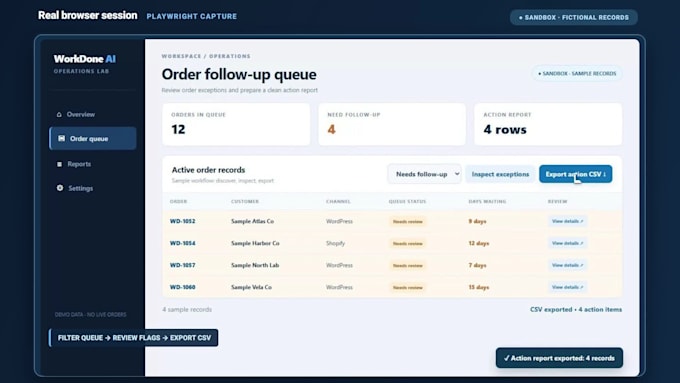
12 fictional orders, 4 flagged issues, a CSV action list. No customer website changed.
BASIC: 1 task on 1 site.
STANDARD: multi-step on up to 3 sites.
PREMIUM: broader work on up to 5 sites.
See package details. Site changes may need separate maintenance.
No unauthorized access, security bypass, or unapproved payments/messages. See our portfolio and Monday Report PDF. Choose a package and describe your task in order requirements.
WorkDone Ai
Talen
Can it check my Monday report instead of just showing green ticks?
Yes, where your sources allow it. We can scope a recurring report that checks exported totals against source records and flags mismatches for review. A successful run alone isn't proof the numbers match. I'll confirm feasibility with your sample workflow.
Can it click buttons, fill forms, and move between sites?
Yes, on approved sites when feasible. For example, it can download files, rename them, enter details into a form and produce a spreadsheet you can check. If a record is missing something, it flags that instead of silently passing. Payments or messages need approval.
Can it handle login-required websites?
Potentially, but login and account-security requirements are reviewed first. Sensitive access must be handled safely.
Can you automate CAPTCHA or bypass security controls?
No. I do not bypass CAPTCHA, access controls, platform restrictions, or account security.
Can it upload and download files?
Yes, where the browser or app workflow supports it and the agreed scope includes it.
Can the agent make purchases or send things automatically?
Only when specifically authorized and appropriate. Sensitive or consequential actions should normally include a human-approval step.
What happens when a website layout changes?
Browser workflows may require maintenance when sites change. I explain that dependency clearly before delivery.
Does my computer need to stay on?
It depends on the runtime. We will determine whether local or hosted execution makes sense for your workflow.
What will I receive with my browser agent?
Basic covers one task on one site; Standard covers a multi-step task on up to 3 sites; Premium covers a broader workflow on up to 5. Packages include tested output, exception checks, approval points and handover. Choose the package that fits and order directly.
Can this work with desktop apps as well as websites?
Potentially, yes. I confirm the operating system, app access, and workflow first, then choose the safest browser or computer-use approach.