Door categorieën bladeren
Ontdekken
Fiverr Pro
Nederlands
$
USD
I will set up your persistent AWS Windows Cloud Workstation with a static inbound Elastic IP and true residential egress IP via cheap proxy just like in my dev.to guide!
Perfect for:
What you get:
Why this over alternatives?


Cloudprovider:
Amazon Web Services
Expertise:
Installatie
•
Debuggen
•
Configuratie
Cloud computing resource:
EC2
•
VPC
•
ELK
•
RDS
Why this over alternatives?
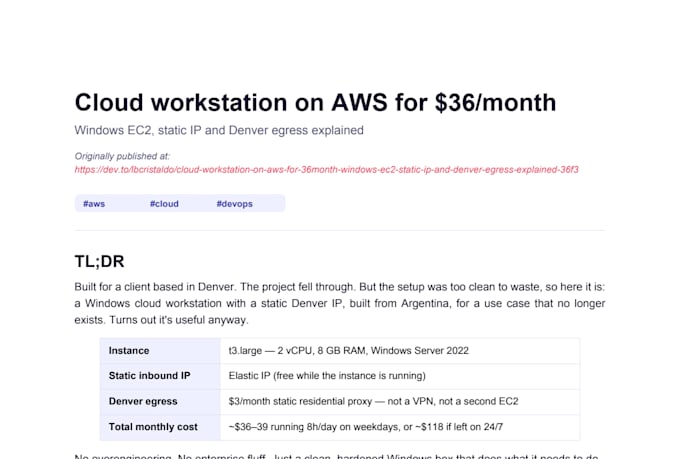
This setup is based on my detailed guide on dev.to: https://dev.to/lbcristaldo/cloud-workstation-on-aws-for-36month-windows-ec2-static-ip-and-denver-egress-explained-36f3 Check it out for the full explanation, scripts, and cost breakdown!
What do I need to get started?
Your active AWS account (with billing enabled), your current IP address (to restrict RDP access), and your preferred location for the residential egress (e.g., Denver, New York, etc.). I’ll guide you step by step if needed.
How much does the workstation cost per month?
~$30–40 USD/month if you use it only during business hours (8h/day, 5 days/week) thanks to stop/start. + ~$3–5/month for the residential proxy (not included). Much cheaper than WorkSpaces.
Is the residential proxy tied to a specific location?
Yes, you choose the city/state/country (wide US coverage: Denver, New York, California, Florida, etc.). We use reliable providers like IPRoyal or Webshare. You subscribe directly.
Can I install any software or app?
Yes, you have full control: install whatever you need (Chrome extensions, Office, dev tools, etc.). The environment is persistent via EBS.
How do I access the machine?
Via Remote Desktop (RDP) from any device (PC, Mac, mobile). I provide a complete guide + secure credentials. Access is restricted to your IP only for security.
How long does delivery take?
1–3 days depending on the package. Basic: 1 day; Standard/Premium: 2–3 days. Includes testing and limited revisions.
What if I need changes or support later?
The gig is a one-time setup. For monthly maintenance or extras (auto start/stop, extra security), order a Gig Extra or contact me for a custom offer.
Do I need any technical knowledge or experience?
No technical knowledge is required from your side! I'll handle the entire setup (EC2 launch, security groups, proxy configuration, hardening, etc.) using my scripts and best practices. You just need to provide your AWS account details.