Door categorieën bladeren
Ontdekken
Fiverr Pro
Nederlands
$
USD



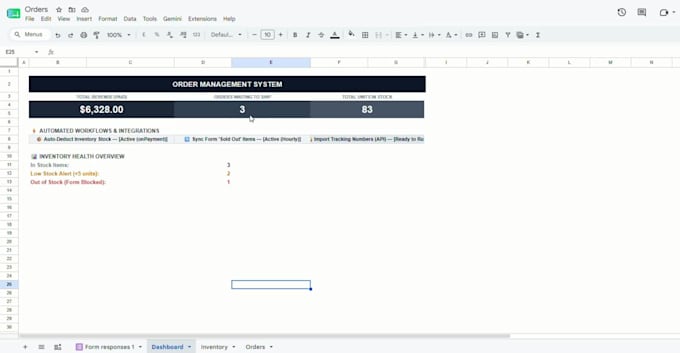
Still wasting time doing repetitive tasks manually in Google Sheets or other Google Workspace apps?
I will build a custom Google Apps Script automation that saves you time, reduces manual work and makes your workflow more efficient.
I can automate:
Whether you need a simple task automated or a complete workflow connecting multiple Google services, I will build it around your exact requirements.
Don't know if your process can be automated? Send me a message and describe what you currently do manually. I'll help you find the best solution before you order.
Full Stack Developer and Automation Expert
Talen
What can you automate with Google Apps Script?
I can automate Google Sheets, Forms, Gmail, Drive, Calendar and workflows between them. I can also connect Google Workspace with external services through APIs
Can you automate my existing Google Sheet?
Yes. I can work with your existing spreadsheet and add custom automation without requiring you to rebuild your current system.
Can you connect Google Forms with Gmail or Google Sheets?
Yes. For example, a form submission can automatically process data, update a spreadsheet, send a personalized email and trigger other actions.
Can you integrate an external API?
Yes. If the service provides a suitable API, I can connect it to your Google Workspace workflow using Apps Script.
I don't know exactly what I need. Can you help?
Absolutely. Send me your current workflow and explain what you want to automate. I'll suggest the best approach before development.