Door categorieën bladeren
Ontdekken
Fiverr Pro
Nederlands
$
USD


Automatische vertaling
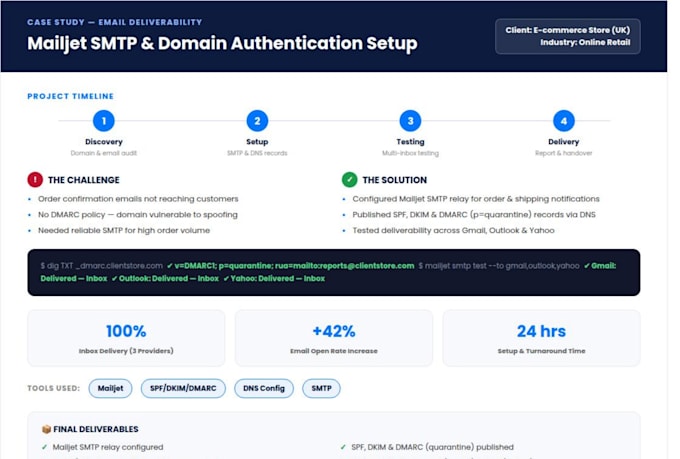
Gaan je e-mails naar SPAM of worden ze helemaal niet bezorgd? Ik maak en herstel je Mailjet SMTP en API configuratie op professionele wijze
zodat je e-mails elke keer direct in de INBOX terechtkomen, gegarandeerd
correcte setup, geen giswerk.
Als je klanten verliest omdat wachtwoord reset e-mails nooit
aankomen, orderbevestigingen verdwijnen of OTP-codes in spam belanden,
ben je hier aan het juiste adres. Problemen met e-mailbezorging kosten
bedrijven echt geld en vertrouwen, en ik los dat op de kern op
niet alleen met een tijdelijke oplossing.
WAAROM MAILJET BEZORGING BELANGRIJK IS
Mailjet is een krachtig platform voor transactionele en marketing e-mails,
maar zonder juiste SMTP-configuratie en DNS-authenticatie, zelfs
de meest betrouwbare service zal je e-mails rechtstreeks naar spam sturen
of stilletjes laten falen. De meeste problemen met bezorging komen neer op drie
zaken: ontbrekende SPF-records, niet-geverifieerde DKIM-handtekeningen of
onjuiste DMARC-beleid. Ik identificeer precies wat er kapot is en herstel
het correct, niet alleen een snelle oplossing, maar een permanente,
professionele oplossing.
Met meer dan 7 jaar ervaring in e-mailbezorging, SMTP
infrastructuur en API-integraties, specialiseer ik me in volledige
Mailjet setup vanaf nul.
DIGITAL EDITOR
Talen
Automatische vertaling
Automatische vertaling
Wat doe je precies om mijn Mailjet e-mailbezorgingsproblemen op te lossen?
Ik diagnoseer je huidige Mailjet setup, identificeer de oorzaak van de bezorgingsfout (ontbrekende SPF/DKIM records, verkeerde SMTP-inloggegevens, geblokkeerde domein of verkeerd geconfigureerde API), los alle problemen op en stuur je een testmail met een screenshot van de inbox als bewijs. Je ontvangt alle bijgewerkte setup.
Kun je Mailjet SMTP integreren met mijn WordPress of WooCommerce site?
Ja, zeker. Ik configureer Mailjet SMTP met populaire WordPress plugins zoals WP Mail SMTP, FluentSMTP en Post SMTP. Dit dekt alle transactionele e-mails — orderbevestigingen, wachtwoord resets, contactformulieren en OTP e-mails. WordPress integratie is inbegrepen in de standaard en premium pakketten.
Moet ik je toegang geven tot mijn hosting of cPanel?
Ja, ik heb tijdelijke toegang nodig tot cPanel of DNS provider om SPF, DKIM en DMARC records toe te voegen. Ik voeg alleen de benodigde DNS records toe — niets anders. Voor je veiligheid raad ik aan je wachtwoord te veranderen nadat het werk klaar is. Al je inloggegevens blijven strikt vertrouwelijk tijdens het proces.
Wat als mijn e-mails nog steeds naar spam gaan na de bezorging?
Ondersteuning na levering is inbegrepen in alle pakketten. Als je e-mails nog steeds naar spam gaan nadat ik de setup heb voltooid, onderzoek ik het probleem en los ik het op zonder extra kosten. Ik lever ook een score screenshot van mail-tester.com die je spam rating toont — een score van 9 of 10 uit 10 bevestigt dat je in de inbox terechtkomt.